NewDirect Kineform from Claude with MCP

Motion graphics with
real 3D, light and glass

Design launch films, product reels and kinetic type in your browser — editable to the last keyframe, with an AI that builds alongside you.

Rendered in Kineform

Built different, on purpose

EngineReal-time GPU, in the browser
ExportH.264 on your own machine
AgentsClaude & ChatGPT via MCP
FormatEvery frame stays editable

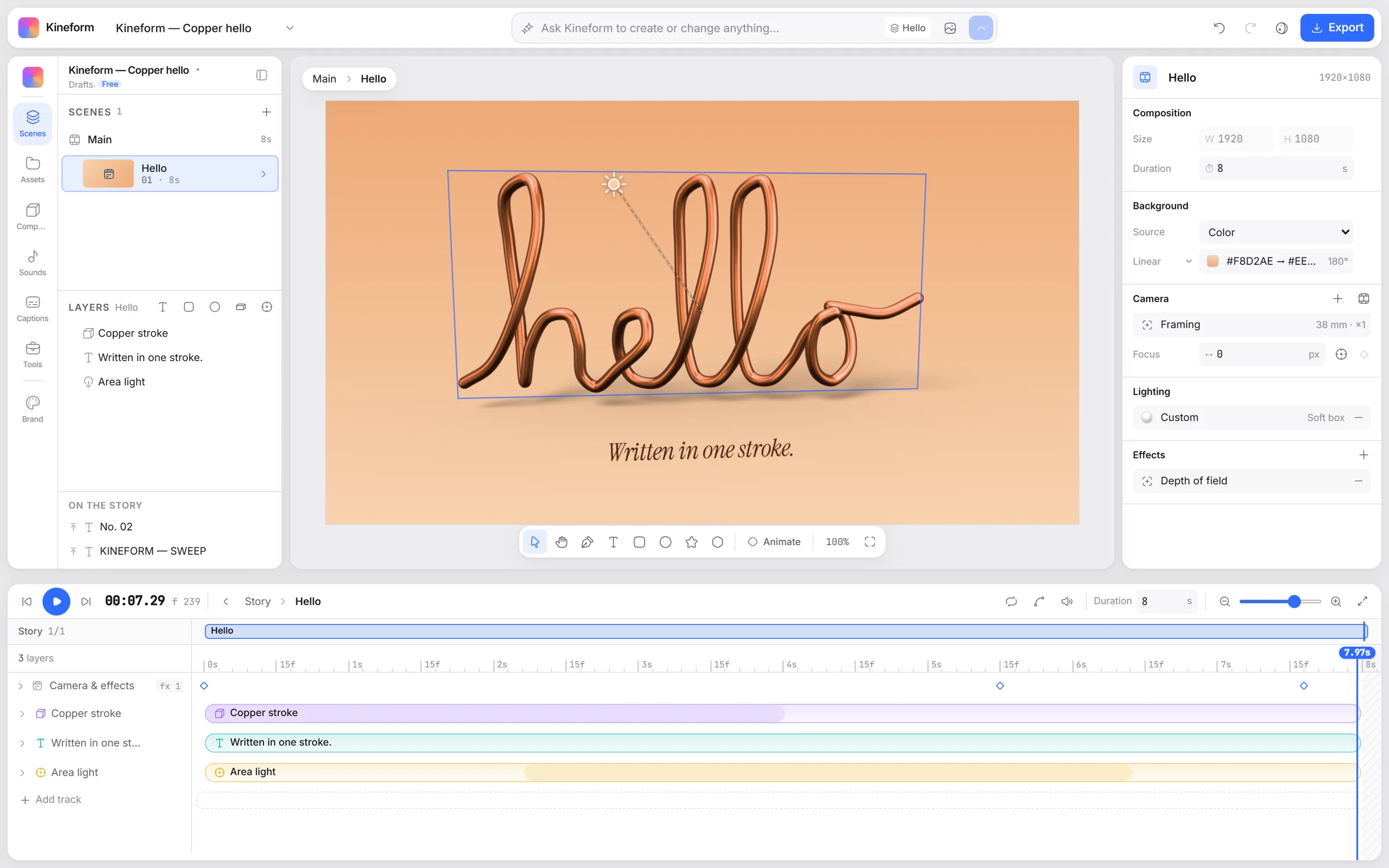
One studio for everything that moves. Timeline, layers, camera and light.

The Kineform studio: a copper 3D sweep on a peach floor, with layers, inspector and timeline

Three steps from idea to film, and the first one is a sentence.

01 Describe it

Ask Kineform
A 10s launch film — glass logo, warm light, slow push-in
Built 3 scenes · 14 layers · one undoable step

A launch film, a product reel, a logo sting. Kineform builds real scenes — layers, light and camera — not a flat video.

02 Direct it

Timeline
0s2s4s6s8s
Glass logo
Headline
Key light
Camera

Every layer, keyframe and camera move stays editable. Retime it, restyle it, or ask for the change.

03 Export it

Export
Format
MP4 · H.264
Size
3840 × 2160
Frame rate
60 fps

Encoding on this device

Render up to 4K right in your browser, on your own machine. No render queue, no waiting on an upload.

A real motion engine, not a slideshow with easing.

Real 3D

Extruded type, generated sweeps and lathes, soft area shadows. Turn the camera — it is all really there.

Light you can direct

Thick glass, glow fields, bloom and depth of field. Move the key light and every surface answers.

Kinetic
Per letterMaskBlur 12pxStagger 0.04s

Kinetic type

Animate by letter, word or line — masks, blur, stagger and springs — on any Google font.

Pulse.tsx
export const MotionGraphic = ({ accent }) => {
  const frame = useCurrentFrame();
  return <Chart grow={spring(frame)} color={accent} />;
};
accent Sandboxed

Code when you want it

React, HTML, SVG and shader layers sit beside native ones, with their parameters on the timeline.

Make the title land with a bounce

Title: spring entrance, 0.6s

And warmer light, slower camera

Key light 3200K · push-in 4.5s

An AI that edits, not guesses

Ask for a change and it happens in your project, as one step you can see, tweak or undo.

Your AI Kineform

Turn my logo into a 6-second glass sting

Kineform kineform_edit

Done — 2 scenes, open in your studio.

Make it 9:16 too

MCP server

Connect Claude, ChatGPT or Cursor and direct your projects from the chat you already use.

Nothing here is an add-on, and none of it costs extra.

108 transitions

Pushes, whips, frosted glass, light leaks and 3D flips, centred on the cut and tuned per scene.

77 motion presets

Entrances, exits, emphasis and camera moves that create real keyframes you can still edit.

42 caption styles

Word-timed captions from speech, with per-word motion and real motion blur.

262 sounds

Whooshes, impacts, interface clicks and music beds, placed where the accent lands.

41 shaders and filters

Mesh gradients, silk, aurora, halftone and CRT — as fills, backdrops or a finishing pass.

3D devices

Phones, tablets and laptops with your recording, screenshot or a live interface inside.

Motion blur and focus

True sub-frame motion blur on everything that moves, and focus pulls on the camera.

Cloud save and history

Every change is a step you can undo, saved to your account and picked up on any machine.

Pro templates

Launch films, product demos and title sequences, built the way you would — open one and make it yours.

Free to make. Simple pricing.

FreeForever

$0/mo

AI
With credit packs
Projects
Unlimited
Export
Local, H.264
Charged
Never
  • The full studio and engine
  • 3D, glass, light and camera
  • Code layers (React, SVG, shaders)
  • Templates, presets and transitions
  • Cloud save and version history
  • MCP server for your AI tools
  • Export on your device
Start free

No card needed.

Fair questions, straight answers.

Do I need to install anything?

No. The studio runs in your browser and renders on your computer's graphics card. Exports are encoded on your own machine too, so there is no render queue.

What can I make with it?

Launch films, product demos, app promos, logo stings, kinetic type, social clips, captions for talking-head videos — anything that moves, from a single title to a multi-scene film.

Can I use my own code?

Yes. React, HTML, SVG, Three.js and shader components run as layers next to native ones. They run sandboxed, and their parameters show up on the timeline.

How does the AI work?

Ask for what you want in plain words. The assistant edits your project like you would — every change is one step you can inspect, tweak or undo. AI actions use credits.

What is the MCP server?

It lets AI tools like Claude, ChatGPT and Cursor work on your Kineform projects. Connect kineform.app/mcp, sign in, and direct your projects from your chat.

Is there a free plan?

Yes. The studio, saving and exporting are free. AI actions — the assistant, generated images and voice, transcription — use credits from a plan or a credit pack.

What does my computer need?

A recent desktop browser with WebGL 2. Kineform uses your graphics card for the engine and your browser's video encoder for exports.
Your next launch film, by tonight.

Start free